Tasks and Queues
Pagode includes a powerful background task processing system that allows you to offload time-consuming operations from your request handlers.
Tasks System
The background task system is built on SQLite for persistence, ensuring that your tasks survive application restarts. This approach provides:
- Persistent storage for queued tasks
- Multiple named queues for different task types
- Delayed execution capabilities
- Automatic retries for failed tasks
- Monitoring and management through the admin panel
Queues
Tasks can be dispatched to different queues to manage priority and resource allocation:
// Define different queue names
const (
    QueueDefault = "default"
    QueueEmails  = "emails"
    QueueImports = "imports"
)
Each queue can be configured with different worker counts, retry settings, and priorities.
Dispatcher
The task dispatcher is included in the service container and can be used to queue up work:
// Queue a task for immediate processing
err := c.Tasks.Queue(ctx, QueueEmails, tasks.SendEmailParams{
    To: "user@example.com",
    Subject: "Welcome!",
    Template: "welcome",
})

// Queue a task with a delay
err := c.Tasks.QueueIn(ctx, QueueImports, time.Minute*5, tasks.ImportDataParams{
    ImportID: importID,
})
Creating Task Handlers
Task handlers are simple functions that process the task data:
// Register a task handler
func init() {
    tasks.Register("send_email", ProcessSendEmail)
}

// Task processor function
func ProcessSendEmail(ctx context.Context, container *services.Container, params tasks.SendEmailParams) error {
    return container.Mail.Send(ctx, mail.Email{
        To:       params.To,
        Subject:  params.Subject,
        Template: params.Template,
        Data:     params.Data,
    })
}
Task Parameters
Task parameters must be serializable to JSON. Define your parameter structs with the fields needed for processing:
type SendEmailParams struct {
    To       string                 `json:"to"`
    Subject  string                 `json:"subject"`
    Template string                 `json:"template"`
    Data     map[string]interface{} `json:"data"`
}
Monitoring Tasks and Queues
The admin panel includes tools for monitoring task queues:
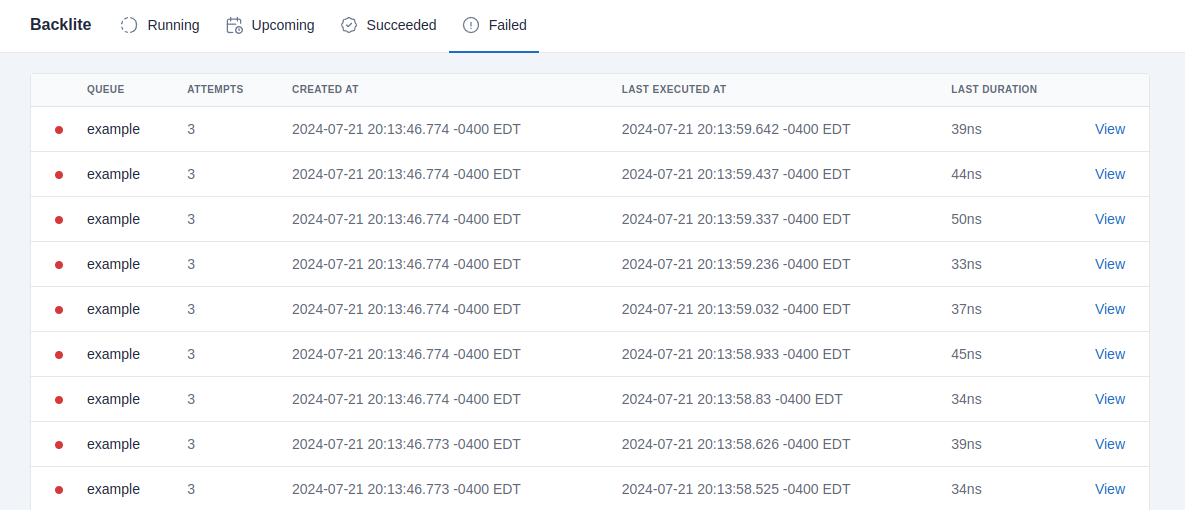
From the admin interface, you can:
- View all active, completed, and failed tasks
- Retry failed tasks
- Delete tasks from the queue
- View detailed error information
- Monitor queue performance
Configuration
Task system configuration can be managed in the config/config.yaml file:
tasks:
  # Number of concurrent workers per queue
  workers:
    default: 5
    emails: 2
    imports: 1

  # Default retry settings
  max_retries: 3
  retry_delay: 60s
Cron Jobs
For scheduled tasks that need to run on a regular interval, Pagode provides a cron system:
// Register a cron job to run every night at midnight
func RegisterCronJobs(scheduler cron.Scheduler) {
    scheduler.MustAdd("cleanup_old_data", "0 0 * * *", func(ctx context.Context, c *services.Container) error {
        return c.Tasks.Queue(ctx, QueueDefault, tasks.CleanupDataParams{})
    })
}
The cron system uses the standard cron expression format for scheduling.